Structural analysis and design that runs the moment you open it.
Build or import a 3D model, analyse it and check members to EC3, AISC 360, EC2, ACI 318, EC5 or NDS — in your browser, no install and no account needed to start.
- Imports STAAD .std, SAP2000 and IFC
- Six design codes
- Checked against published examples on every release

Reads your files
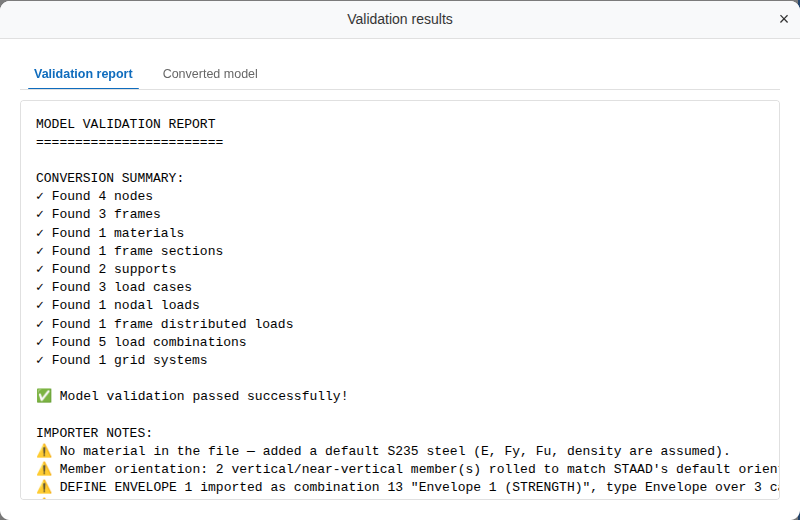
STAAD .std, SAP2000 .xml / .sdb and IFC, with a log of everything not brought across.
Six design codes
EC3 and AISC 360 for steel, EC2 and ACI 318 for concrete, EC5 and NDS for timber.
Five analysis types
Linear static, modal, response spectrum, buckling and P-Delta on 3D frames and plates.
Runs where you are
In the browser, in the cloud or in the desktop app — the same solver every time.
From file to design check
Import or build the model
Open a STAAD .std, SAP2000 or IFC file, start from one of the 20 sample models, or draw frames and plates yourself. The import report counts what was brought across and names every assumption, so nothing is dropped without a word.
Analyse it
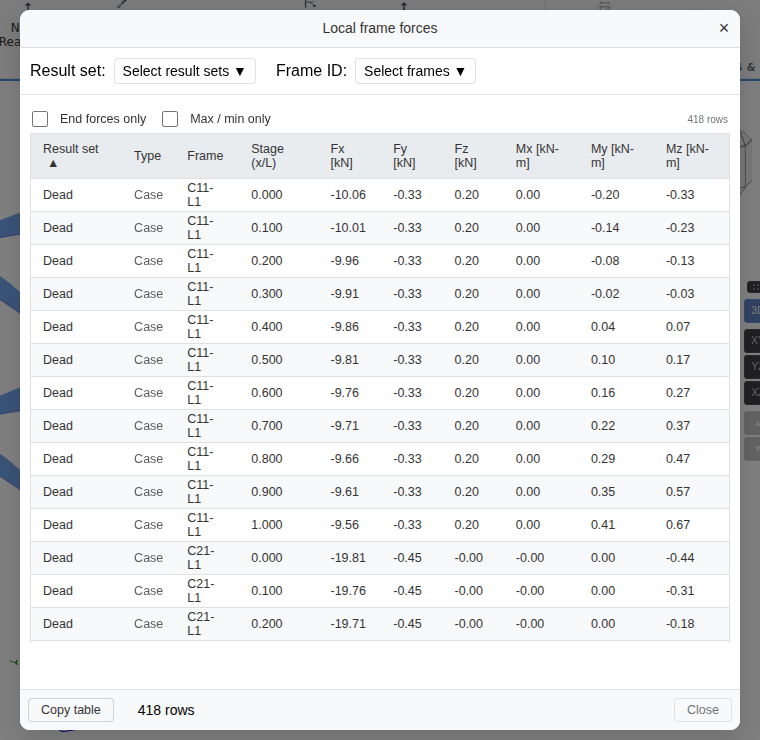
Run linear static, modal, response spectrum, buckling or P-Delta analysis in the browser or in the cloud. Read the deflected shape and force diagrams on the model, and every number in tables you can copy into a spreadsheet.
Check the members
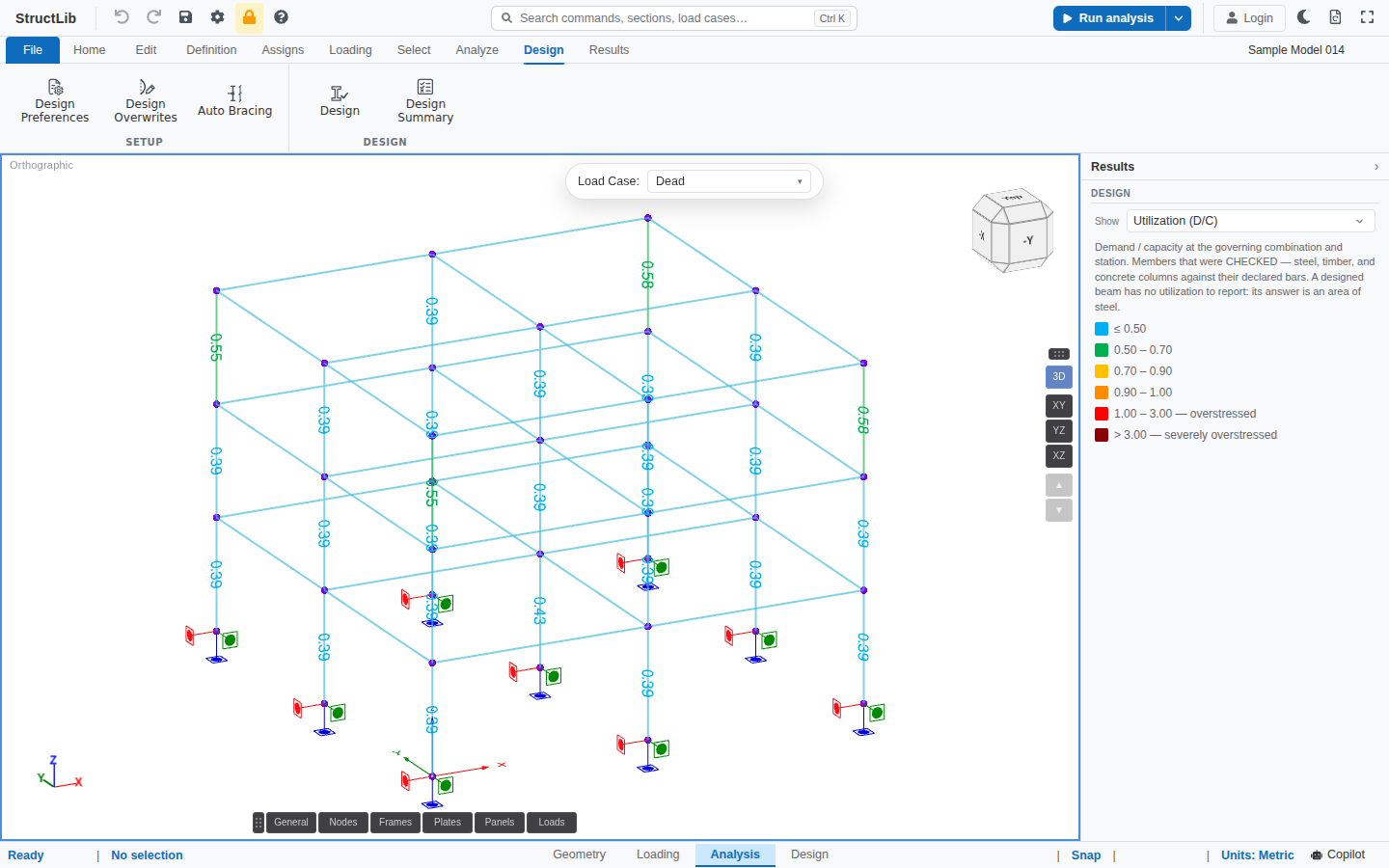
Design steel, concrete and timber members to EC3, AISC 360, EC2, ACI 318, EC5 or NDS. Each member is coloured by its utilisation, and the design report prints or saves as a PDF.


Checked against published sources
Every release replays published examples through the same code you use, and fails if an answer moves away from the book.
28 steel design examples
Worked examples from SCI P364, SCI P374, the BCSA/SCI Handbook of Structural Steelwork and the Designers’ Guide to Eurocode 3 — section properties, classification, resistances and buckling curves compared clause by clause.
Analysis verification examples
The published CSI verification examples 1-001, 2-002, 2-005 and 2-006, run through the same path as your model.
Closed-form solutions
Stability and dynamics results checked against exact solutions that need no reference software at all.
AISC 360, concrete and timber design have no published-example suite yet — they rest on hand-checked tests. What is compared, and what is not
Describe the change; the engine does the arithmetic
Copilot in the app
Ask for a change in plain language and the copilot makes it with the same modelling commands you would use — nodes, members, sections, supports, loads — each one undoable. It never produces results: the analysis engine alone computes them.
Connect your own assistant
StructLib is an MCP server. Connect an assistant such as Claude and, with your consent, it can open the models in your projects, run them on the cloud engine and read the results. The copilot and how to connect
Prefer a desktop application?
Structural is also a desktop app for Windows, macOS and Linux. It runs the same solver natively on your computer and signs in to the same account, on every plan — Free included, with the same limits as in the browser. The download page has the current release for each system.
Structural, and three more tools
Structural
3D frames and plates: build or import a model, analyse it and check its members — in the browser, in the cloud or on the desktop, with the same solver.
More about Structural →Connection Design
Steel moment and shear connections — extended end plate, flange plate and reduced beam section moment connections to AISC 358, single-plate and end-plate shear connections — with drawings and a PDF report.
More about Connection Design →Quick Design
45 calculators for single checks and sizing, one element at a time.
More about Quick Design →SeismoLab
Ground-motion records: time series, ground-motion parameters, elastic response spectra, filtering and Fourier spectra — computed in your browser.
More about SeismoLab →Frequently asked questions
Do I need to install anything?
No. Structural runs in your web browser: open app.structlib.com/structural/ and it is ready. If you would rather work in a desktop application, there is one for Windows, macOS and Linux on the download page at app.structlib.com/download, on every plan, Free included.
Do I need an account to try it?
No. You can open any of the 20 sample models and run the analysis without signing in. A free account lets you save your own models to projects.
How much does it cost?
The Free plan costs nothing: models up to 300 members, up to 3 saved cloud projects, analysis in your browser or the desktop app and 20 AI copilot turns a month. Pro and Team remove those limits and add the cloud engine; their prices are planned and shown on the pricing page at structlib.com/pricing, and online payment is not open yet — email [email protected] to use one now.
Where does the computation run?
In the browser, the solver runs on your own computer as WebAssembly, and the model never leaves it. The desktop app, on every plan, runs it natively on your machine. On Pro and Team you can also run on the cloud engine, which sends the model to the server where the same solver runs natively. It is one solver in every case, so the answers agree.
Which file formats can I import?
STAAD.Pro .std files, SAP2000 .xml and .sdb files, IFC, and SkyCiv .json and XFEM4U .xml exports. Every import writes a log that counts what was brought across and names each assumption and everything that was not, so nothing is dropped silently.
How do you know the results are right?
The steel member checks replay 28 worked examples from published design guides on every release, clause by clause, and the analysis is checked against the published CSI verification examples 1-001, 2-002, 2-005 and 2-006 and against closed-form solutions for stability and dynamics. AISC 360, concrete and timber design have no published-example suite yet; they rest on hand-checked tests.
Open a sample and run it
Twenty sample models, ready to analyse in your browser. No install, no account needed.